Sunday, 26 August 2012

HOW TO FIX BLUE SCREEN OF DEATH


Blue Screen of Death is a very common error that occurs in all the versions of the Windows OS, be it Win XP, or Win Vista or Windows 7. A lot of major as well as minor hardware and software related issues can lead to Blue Screen of Death (BSOD). Sometimes you can resolve the issue by simply solving it by restarting your PC. However, many times the BSOD screen won’t allow you to reach the desktop or even if you have reached the desktop, the BSOD screen can appear all of a sudden while you are doing something important on your PC.


BSODs appear when Windows encounters a serious problem and stalls the operating system. You can easily fix BSOD issues by examining all the factors that has triggered it. Here are some things you should do when you encounter a BSOD:
1. Some BSODs are so bad that you may end up installing fresh copy of Windows on your system. If you are not able to access your data after the occurrence of BSOD, you may also end up losing all your precious data. So, you need try your best to reach the desktop. You can try the ‘Last Known Good Configuration’ option or by going into the Safe Mode. You can try both of these options by pressing the F8 key before the appearance of the Windows loading screen. If you do it correctly, you will see the ‘Windows Advanced Options Menu’ screen where you will see options like Safe Mode, Safe Mode with Networking and Last Known Good Configuration.


2. When you see the BSOD, you should read the message that appears on it carefully. Usually, the error screen contains a ‘STOP ERROR’ code that consists of numbers and alphabets. The code varies depending on the problems that have caused the respective BSOD error. So, the first thing you need to do is make a note of the error code.


3. If your system is displaying the BSOD screen after recent installation of hardware or software, you can try uninstalling the hardware or software and see if that resolves the issue. After uninstalling the software that caused the problem, you can perform virus scan on your system.
Repairing registry errors by making use of registry applications can help in getting rid of BSODs that are caused by software. Alternatively, you can also try the System Restore option to go back to a date when your system was working perfectly fine.


4. The next thing you need to is to find out what has caused the BSOD by researching on the internet. You can do this on your secondary PC. All you need to do is type the STOP ERROR code on Google and find out what solutions are available. A very good way to find solution for all kinds of BSOD errors is to visit the Microsoft Support website. At Microsoft Support, you will get all the possible solutions that you can try to get rid of the BSOD screen.

Friday, 10 August 2012

Download Chrome OS


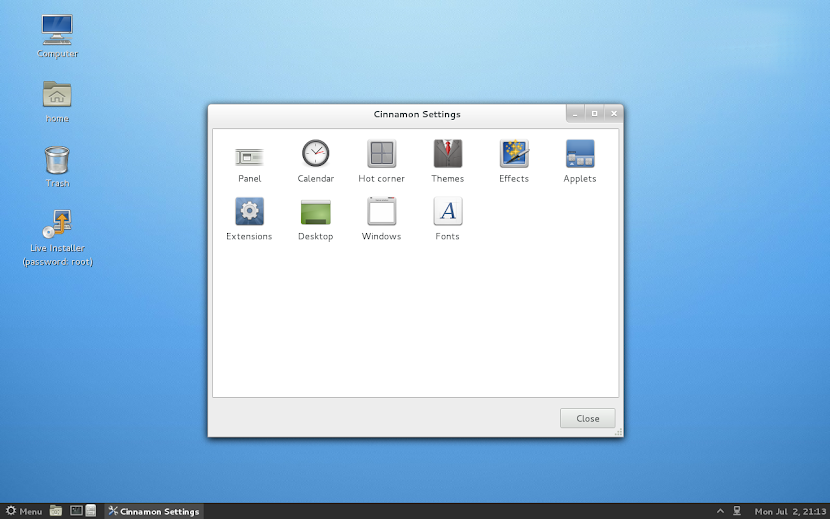
Chrome Linux is the free OS built around the revolutionary Chromium browser - a foundation for Google Chrome. Google call it the chrome plated OS, because it is stable and shiny.

This open source project provides a lightweight Linux distribution similar to Google Chrome OS for the best web browsing experience on any x86 PC, netbook or notebook.


Click here to download

How to install:
Download the iso file and burn it into a DVD-R or download the tar.gz file, unpack it and write to an empty USB drive. Boot the computer from it and when Chrome Linux is loaded, click Live Installer on the desktop. Follow the instructions on the screen.

User password: user
Root password: root


Featured software in the latest Chrome Linux:


  1. Linux kernel 3.4.2 
  2. Cinnamon 1.4 desktop environment 
  3. Chromium 21.0.1145 web browser
  4. Banshee 2.2 media player 
  5. Shotwell 0.11 photo manager 
  6. GIMP 2.6 image editor
  7. LibreOffice 3.5 office suite 
  8. Wine 1.4 Windows emulator 
  9. Cheese 3.2 webcam app 
  10. Pidgin 2.10 instant messenger
  11. Dashboard with the social toolbar
  12. Control Center

and much more!
System requirements of Chrome Linux:

CPU: Intel Pentium, Atom, Xeon or newer; AMD Duron, Athlon, Sempron, Opteron or newer
RAM: min. 512 MB
Hard disk: min. 1 GB
Graphics card: most of graphics cards with 3D hardware acceleration


Tuesday, 7 August 2012

Windows8 free download


Windows 8 Consumer Preview is beta (pre-release) software that may be substantially modified before it's commercially released. According to Microsoft this version of software may not be stable. Direct link for Windows 8 Consumer Preview


English

64-bit (x64)                    Download (3.3 GB)                    
Sha 1 hash — 1288519C5035BCAC83CBFA23A33038CCF5522749

32-bit (x86)                    Download (2.5 GB)                    
Sha 1 hash — E91ED665B01A46F4344C36D9D88C8BF78E9A1B39

Product Key:   DNJXJ-7XBW8-2378T-X22TX-BKG7J

Chinese (Simplified)

64-bit (x64)                    Download (3.4 GB)                    
Sha 1 hash — DF69B851F9A81DECBB16648CC452461894416EB0

32-bit (x86)                    Download (2.6 GB)                    
Sha 1 hash — E29A2072745A48C14A1C2E5A61F5230841BEDB45

Product Key:   DNJXJ-7XBW8-2378T-X22TX-BKG7J
French

64-bit (x64)                    Download (3.3 GB)                    
Sha 1 hash — A9358E6799ABEEF29EDBA054AD34849C02C7F51F

32-bit (x86)                    Download (2.5 GB)                    
Sha 1 hash — 2EF8013B9F50B93AEAC8068F4827E2C1DC0DC0B1

Product Key:   DNJXJ-7XBW8-2378T-X22TX-BKG7J
German

64-bit (x64)                    Download (3.3 GB)                    
Sha 1 hash — DB1003A47C266697B3832BE2A23319988EE34495

32-bit (x86)                    Download (2.5 GB)                    
Sha 1 hash — 91075AEA665C5D6F42A24714B3A3390762C94457

Product Key:   DNJXJ-7XBW8-2378T-X22TX-BKG7J

Japanese

64-bit (x64)                    Download (3.3 GB)                    
Sha 1 hash — A8F0DB12CAECEA0BE8B27EA124F2234212D9103A

32-bit (x86)                    Download (2.5 GB)                    
Sha 1 hash — C8A322ED86058086207CAAECD46B4DDACF9E247A

Product Key:   DNJXJ-7XBW8-2378T-X22TX-BKG7J

Note: It's a "preview" version, only to give you an idea of Windows 8's User Interface and General Information. Not meant to be used as your primary OS. 

Wednesday, 25 July 2012

Unhide the Files or Folders


Files Hidden by Virus(or manually). How to Unhide Them?

The Problem

My friend was frightened when he found  his Final Year Project files were missing from his pen drive. He thought the files were already gone by a virus attack or were accidentally deleted by his friends.

After I did some analysis, I found out the files are still there but a virus had modified the file properties to ‘Hidden’ and hide all files in the pen drive.

Although he  tried to “Show Hidden Files” but the virus does not allow him to view them. Luckily, he has a very intelligent and clever friend. Who guides him on how to overcome this problem.

The Solution


Click here to Download this Software

In case of pendrive:

1. Insert the pen drive to an empty USB slot.

2. Copy downloaded software to your pen drive.

3. Double click on the .exe file.

4. Thats it now the software looks after every thing and shows you the hidden files and folders.

Note: This not only works in the pendrive but also works in the system(hard disks drives C,D,E,F) to unhide the files and folders. Copy and paste the the software in the required position( in a drive or in a folder inside the drive)  Now follow the step:3&4.

When the Files are hidden by the VIRUS(or manually)


After using the unhide software 


Sunday, 22 July 2012

Samsung Galaxy S3


Microsoft Surface


Microsoft Surface is the product of Microsoft. It is just like the iPad of Apple. It is a touch sensitive device and can be used as a computer. 

Friday, 20 July 2012

Mac Blu-ray Player 2.4.0


Mac Blu-ray Player is the first universal media player for Mac&PC in the world. It can not only play blu-ray HD movies on Mac or PC, but also support any movie, video, audio, music and photo you have ever seen. Meanwhile it supports Blu-ray ISO on Mac. It can support all the media formats existing today with powerful functions. Mac Blu-ray Player kept easy to understand and navigate with user-friendly interface and nice layout. After adding DTS5.1 into it, Mac Blu-ray Player can bring your PC or Mac to the most popular Blu-ray HD video enjoyment.

With advanced Blu-ray decryption and processing capability, Mac Blu-ray Player can decrypt any Blu-ray discs successfully as well as DVD. The Mac Blu-ray Player is possible to read commercial Blu-ray discs released in different regions, as well as removing BD+ and AACS encryptions from latest Blu-ray movies. It allows users loading commercial blu-ray discs directly from Blu-ray Disc and Blu-ray Folder. Also, Mac Blu-ray Player is able to play DVD discs. It supports DVD decryption and DVD menu. Mac Blu-ray player plays not only Blu-ray or DVD discs but also their ISO files.

Besides it is the world’s very first blu-ray player for Mac, Mac Blu-ray Player is the most powerful and distinguished blu-ray player at present. Mac Blu-ray player is able to play anything here no matter the formats or categories. It can not only play Blu-ray HD movies on Mac or PC, but also support all formats of movie, video, audio, music and photo that exist today, including Blu-ray, DVD, VideoCD, MOV, MKV, AVI, FLV, WMV, MP4, MPEG, RMVB, MP3, WMA, AAC, AC3 and more.
What's new in Mac Blu-ray Player 2.4.0:
• More stable playback
• Fix some bugs of blackscreen and playback crash
• Japanese and Simple Chinese translation updated
Shareware version has watermark while playing Blu-Ray discs, NO 30 days time limited software. This functional limitation will disappear after you purchase the software. Other file formats like MOV, MKV, AVI, FLV, WMV, MP4, MPEG, RMVB, MP3 are 'watermark free'.
Download: Mac Blu-ray Player 2.4.0 | 30.2 MB (Shareware)
Download: Mac Blu-ray Player 2.4.0 for Windows | 34.8 MB